Buy autoplin.eu ?
We are moving the project
autoplin.eu .
Are you interested in purchasing the domain
autoplin.eu ?
domain@kv-gmbh.de · 0541-91531010
Buy autoplin.eu ?
Did the Ubuntu installation via USB fail?
No, the Ubuntu installation via USB did not fail. **
"Is the USB broken after the Linux installation?"
It is possible that the USB could be broken after the Linux installation, especially if there were any issues during the installation process. However, it is also possible that the USB is still functional and the issue may be related to the installation itself. It would be helpful to troubleshoot the issue by trying the USB on another device or checking for any physical damage. Additionally, checking the system logs or error messages during the installation process could provide more insight into the issue. **


Similar search terms for Usb
Top-Angebote
Products related to Usb:
-
The Cart Load Quick Coupler Adapter, Car A C High Low Side Conversion Kit For Easy Installation Quick Coupler Adapter, Car A C High Low Side Conversion Kit For Easy InstallationThe Quick Coupler Adapter is an essential tool for anyone looking to convert their cars air conditioning system from R1234yf to R134a. This Fits Car AC High Low Side Conversion Kit ensures a seamless connection, providing a quick and hasslefree...44,97 $*Shipping: 0,00 $Secure redirect to the provider
-
Multisell Products Hub Easy Installation Brake Conversion Seat, High Strength Aluminum Alloy Extension blackUpgrade Your Driving with the High Strength Aluminum Alloy Brake Extension Experience enhanced 1 pair performance and durability with the Brake Extension High Strength Aluminum Alloy. This brake conversion seat is crafted with precision to provide a...39,97 $*Shipping: 0,00 $Secure redirect to the provider
-
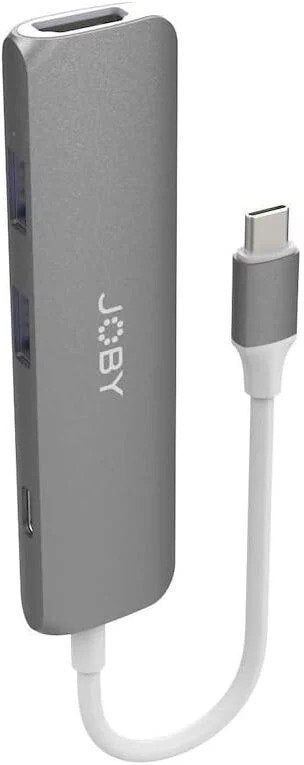
Joby USB C Hub with HDMI 4K, 2 USB-A 3.0 sockets, USB C PD, USB Multi-socket, USB Hub, NewExpand your device connectivity with the JOBY USB-C Hub with HDMI 4K, 2 USB-A 3.0 Sockets & USB-C Power Delivery, a compact and versatile multi-port adapter designed for laptops, tablets, and USB-C devices. Perfect for professionals, students, and content creators, this hub allows you to connect multiple peripherals and external displays while keeping your device powered. Built with a durable aluminium housing and sleek design, the hub offers reliable performance and portability for everyday work, travel, or home setups. It enables you to mirror or extend your laptop display to a monitor or TV in up to 4K resolution, while also connecting USB devices such as keyboards, flash drives, or external storage. ✔️ 4K HDMI Output – Mirror or extend your display to a monitor or TV up to 3840 × 2160 @ 30Hz ✔️ 2 × USB-A 3.0 Ports – High-speed data transfer up to 5Gbps for peripherals and storage devices ✔️ USB-C Power Delivery Port – Supports pass-through charging while using the hub ✔️ Compact Aluminium Design – Durable, lightweight housing ideal for travel and daily use ✔️ Plug-and-Play Connectivity – No drivers required, easy setup with USB-C laptops and tablets ✔️ Wide Compatibility – Works with MacBook, iPad Pro, and USB-C laptops ✔️ Multi-Device Connectivity – Connect keyboards, mice, USB drives, and external displays simultaneously ✔️ Portable & Lightweight – Small form factor perfect for mobile workstations The JOBY USB-C Hub 4-in-1 is an ideal solution for users who need extra connectivity from a single USB-C port. Whether you're presenting on a larger screen, transferring files, or connecting accessories, this hub provides reliable performance and convenience in one compact device17,99 £*Shipping: 0,00 £Secure redirect to the provider
-
Uplift Essentials Electric Knife Sharpener & Polisher Professional USB Rechargeable Honing Tool High Precision Kitchen Blade Maintenance orangeAchieve culinary optimization with this Electric Knife Sharpener. Specifically engineered for edge transparency, this highperformance maintenance device acts as a vital tool for cutting efficiency, neutralizing dullness and blade fatigue with...69,97 $*Shipping: 0,00 $Secure redirect to the provider



-
How does the conversion from 12V DC to USB work?
The conversion from 12V DC to USB involves using a voltage regulator to step down the 12V DC input to the 5V DC output required by USB devices. The voltage regulator ensures that the output voltage remains stable and within the USB standard. Additionally, the conversion may also involve filtering and smoothing the output to remove any noise or fluctuations in the voltage. This process allows devices that require a 5V USB power source to be powered by a 12V DC input, making it compatible with a wider range of devices and power sources. **
-
Why is the Windows 7 installation USB not starting?
The Windows 7 installation USB may not be starting due to a few reasons. It could be that the USB drive is not properly configured with the Windows 7 installation files, or the computer's BIOS settings may not be set to boot from the USB drive. Additionally, the USB drive itself may be faulty or corrupted, preventing it from starting the installation process. It's important to ensure that the USB drive is properly prepared with the correct installation files and that the computer's BIOS settings are configured to boot from the USB drive. If the issue persists, trying a different USB drive or recreating the installation media may be necessary. **
-
Do you need a bootable USB stick for the Linux installation?
Yes, you typically need a bootable USB stick for installing Linux on a computer. This is because Linux distributions are usually provided as ISO files that need to be written to a USB stick in a bootable format. The USB stick allows you to boot into the Linux installer and proceed with the installation process on your computer. **
-
How do I transfer the installation CD to a USB stick?
To transfer the installation CD to a USB stick, you will need to create a bootable USB drive. You can use software like Rufus or UNetbootin to create a bootable USB drive from the contents of the installation CD. Simply insert the USB stick into your computer, open the software, select the CD image file, and follow the prompts to create the bootable USB drive. Once the process is complete, you can use the USB stick to install the software or operating system on another computer. **


Is there a WLAN USB stick that does not require installation?
Yes, there are WLAN USB sticks that do not require installation. These are often referred to as "plug and play" devices, meaning they can be simply plugged into a computer's USB port and will automatically be recognized and configured without the need for additional installation steps. These types of USB sticks are convenient for users who want a quick and easy way to connect to a wireless network without dealing with software installation. **
Why is my USB stick not being recognized for Windows installation?
There could be several reasons why your USB stick is not being recognized for Windows installation. It could be due to a faulty USB port, a corrupted USB stick, or an incompatible file system format. Make sure to try using a different USB port, format the USB stick to the correct file system format (such as NTFS), and ensure that the USB stick is not physically damaged. Additionally, check if the USB stick is being recognized by your computer's BIOS settings. If none of these solutions work, it may be necessary to try using a different USB stick. **
Top-Angebote
Products related to Usb:
-
Modern Mode Marketplace Fake Charger Diversion Safe Hidden Storage Compartment usb SavingsProtect small valuables without making them look hidden. This fake charger safe blends into everyday spaces, giving you a discreet place for cash, keys, jewelry, or tiny keepsakes. Designed for home, office, dorm, or travel use, it looks like an...29,97 $*Shipping: 0,00 $Secure redirect to the provider
-
Smart Shopping Spot Motorcycle Refueling Funnel With Filter Gasoline & Engine Oil Funnel For Car Repair & Maintenance Motorcycle Refueling Funnel With Filter Gasoline & Engine Oil Funnel For Car Repair & MaintenanceWhen it comes to maintaining your motorcycle or car, precision and convenience are key. The motorcycle refueling funnel with filter ensures you can easily and cleanly transfer gasoline or engine oil, without the mess. Designed for both motorcyclists...29,97 $*Shipping: 0,00 $Secure redirect to the provider
-
The Cart Load Quick Coupler Adapter, Car A C High Low Side Conversion Kit For Easy Installation Quick Coupler Adapter, Car A C High Low Side Conversion Kit For Easy InstallationThe Quick Coupler Adapter is an essential tool for anyone looking to convert their cars air conditioning system from R1234yf to R134a. This Fits Car AC High Low Side Conversion Kit ensures a seamless connection, providing a quick and hasslefree...44,97 $*Shipping: 0,00 $Secure redirect to the provider
-
Multisell Products Hub Easy Installation Brake Conversion Seat, High Strength Aluminum Alloy Extension blackUpgrade Your Driving with the High Strength Aluminum Alloy Brake Extension Experience enhanced 1 pair performance and durability with the Brake Extension High Strength Aluminum Alloy. This brake conversion seat is crafted with precision to provide a...39,97 $*Shipping: 0,00 $Secure redirect to the provider
-
Did the Ubuntu installation via USB fail?
No, the Ubuntu installation via USB did not fail. **
-
"Is the USB broken after the Linux installation?"
It is possible that the USB could be broken after the Linux installation, especially if there were any issues during the installation process. However, it is also possible that the USB is still functional and the issue may be related to the installation itself. It would be helpful to troubleshoot the issue by trying the USB on another device or checking for any physical damage. Additionally, checking the system logs or error messages during the installation process could provide more insight into the issue. **
-
How does the conversion from 12V DC to USB work?
The conversion from 12V DC to USB involves using a voltage regulator to step down the 12V DC input to the 5V DC output required by USB devices. The voltage regulator ensures that the output voltage remains stable and within the USB standard. Additionally, the conversion may also involve filtering and smoothing the output to remove any noise or fluctuations in the voltage. This process allows devices that require a 5V USB power source to be powered by a 12V DC input, making it compatible with a wider range of devices and power sources. **
-
Why is the Windows 7 installation USB not starting?
The Windows 7 installation USB may not be starting due to a few reasons. It could be that the USB drive is not properly configured with the Windows 7 installation files, or the computer's BIOS settings may not be set to boot from the USB drive. Additionally, the USB drive itself may be faulty or corrupted, preventing it from starting the installation process. It's important to ensure that the USB drive is properly prepared with the correct installation files and that the computer's BIOS settings are configured to boot from the USB drive. If the issue persists, trying a different USB drive or recreating the installation media may be necessary. **
Similar search terms for Usb
-
Joby USB C Hub with HDMI 4K, 2 USB-A 3.0 sockets, USB C PD, USB Multi-socket, USB Hub, NewExpand your device connectivity with the JOBY USB-C Hub with HDMI 4K, 2 USB-A 3.0 Sockets & USB-C Power Delivery, a compact and versatile multi-port adapter designed for laptops, tablets, and USB-C devices. Perfect for professionals, students, and content creators, this hub allows you to connect multiple peripherals and external displays while keeping your device powered. Built with a durable aluminium housing and sleek design, the hub offers reliable performance and portability for everyday work, travel, or home setups. It enables you to mirror or extend your laptop display to a monitor or TV in up to 4K resolution, while also connecting USB devices such as keyboards, flash drives, or external storage. ✔️ 4K HDMI Output – Mirror or extend your display to a monitor or TV up to 3840 × 2160 @ 30Hz ✔️ 2 × USB-A 3.0 Ports – High-speed data transfer up to 5Gbps for peripherals and storage devices ✔️ USB-C Power Delivery Port – Supports pass-through charging while using the hub ✔️ Compact Aluminium Design – Durable, lightweight housing ideal for travel and daily use ✔️ Plug-and-Play Connectivity – No drivers required, easy setup with USB-C laptops and tablets ✔️ Wide Compatibility – Works with MacBook, iPad Pro, and USB-C laptops ✔️ Multi-Device Connectivity – Connect keyboards, mice, USB drives, and external displays simultaneously ✔️ Portable & Lightweight – Small form factor perfect for mobile workstations The JOBY USB-C Hub 4-in-1 is an ideal solution for users who need extra connectivity from a single USB-C port. Whether you're presenting on a larger screen, transferring files, or connecting accessories, this hub provides reliable performance and convenience in one compact device17,99 £*Shipping: 0,00 £Secure redirect to the provider
-
Uplift Essentials Electric Knife Sharpener & Polisher Professional USB Rechargeable Honing Tool High Precision Kitchen Blade Maintenance orangeAchieve culinary optimization with this Electric Knife Sharpener. Specifically engineered for edge transparency, this highperformance maintenance device acts as a vital tool for cutting efficiency, neutralizing dullness and blade fatigue with...69,97 $*Shipping: 0,00 $Secure redirect to the provider
-
Discount Dollar Deals Silver Automatic Center Punch Tool Time Saving, Precision Punch For Equipment Maintenance Installation Silver Automatic Center Punch Tool Time Saving, Precision Punch For Equipment Maintenance InstallationEffortlessly mark your drilling spots with the Silver Automatic Center Punch Tool. Ideal for onsite installations and equipment maintenance, this tool delivers precise, reliable performance with every use. Its automatic feature makes it the perfect...29,97 $*Shipping: 0,00 $Secure redirect to the provider
-
Multisell Products Hub Easy Installation Brake Conversion Seat, High Strength Aluminum Alloy Extension goldUpgrade Your Driving with the High Strength Aluminum Alloy Brake Extension Experience enhanced 1 pair performance and durability with the Brake Extension High Strength Aluminum Alloy. This brake conversion seat is crafted with precision to provide a...39,97 $*Shipping: 0,00 $Secure redirect to the provider
-
Do you need a bootable USB stick for the Linux installation?
Yes, you typically need a bootable USB stick for installing Linux on a computer. This is because Linux distributions are usually provided as ISO files that need to be written to a USB stick in a bootable format. The USB stick allows you to boot into the Linux installer and proceed with the installation process on your computer. **
-
How do I transfer the installation CD to a USB stick?
To transfer the installation CD to a USB stick, you will need to create a bootable USB drive. You can use software like Rufus or UNetbootin to create a bootable USB drive from the contents of the installation CD. Simply insert the USB stick into your computer, open the software, select the CD image file, and follow the prompts to create the bootable USB drive. Once the process is complete, you can use the USB stick to install the software or operating system on another computer. **
-
Is there a WLAN USB stick that does not require installation?
Yes, there are WLAN USB sticks that do not require installation. These are often referred to as "plug and play" devices, meaning they can be simply plugged into a computer's USB port and will automatically be recognized and configured without the need for additional installation steps. These types of USB sticks are convenient for users who want a quick and easy way to connect to a wireless network without dealing with software installation. **
-
Why is my USB stick not being recognized for Windows installation?
There could be several reasons why your USB stick is not being recognized for Windows installation. It could be due to a faulty USB port, a corrupted USB stick, or an incompatible file system format. Make sure to try using a different USB port, format the USB stick to the correct file system format (such as NTFS), and ensure that the USB stick is not physically damaged. Additionally, check if the USB stick is being recognized by your computer's BIOS settings. If none of these solutions work, it may be necessary to try using a different USB stick. **
* All prices are inclusive of VAT and, if applicable, plus shipping costs. The offer information is based on the details provided by the respective shop and is updated through automated processes. Real-time updates do not occur, so deviations can occur in individual cases. ** Note: Parts of this content were created by AI.